Kwanti now includes Watchlist, a new feature designed to help advisors efficiently monitor and track securities with customizable views and automated price alerts. This enhancement provides a dedicated space to keep tabs on potential investments, client holdings, and market opportunities, all within your existing Kwanti workflow.
What is Watchlist?
Watchlist gives you a streamlined interface to monitor multiple securities simultaneously. Whether you’re tracking stocks for a specific sector, keeping an eye on certain investments for clients, or researching new opportunities, Watchlist provides the flexibility to organize and monitor assets based on your unique needs.
With the ability to create multiple watchlists, you can separate your monitoring by strategy, client segment, investment theme, or any other criteria that supports your practice.
Key Features
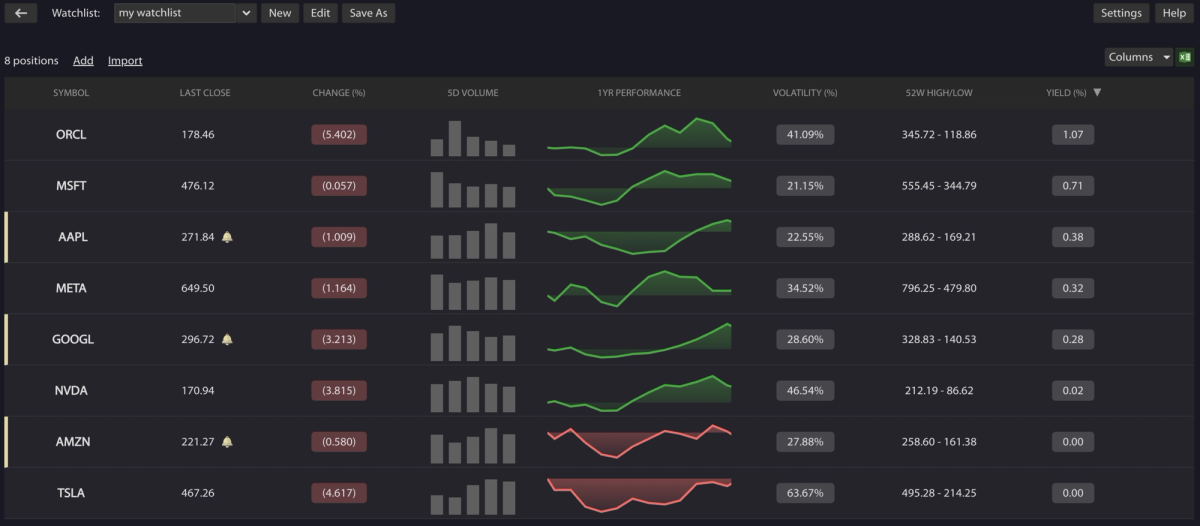
Customizable Display – Select from multiple performance metrics and display up to 10 columns simultaneously. Available metrics include Last Close, Change (%), 5D Volume, 1YR Performance, Volatility (%), Prior Day Volume, and more. Reorder columns by dragging and dropping, and sort by any metric with a single click. This flexibility ensures you’re viewing the data that matters most to your investment approach without unnecessary clutter.
Flexible Import Options – Add securities individually by ticker symbol or import multiple positions at once via CSV file. The bulk import functionality makes it easy to quickly populate watchlists from spreadsheets or existing data sources, saving time when setting up new monitoring lists or transitioning from external platforms.
Automated Price Alerts – Set custom price thresholds for any security on your watchlist. Receive email notifications when a security’s closing price crosses your specified threshold. Create multiple alerts per security to monitor different price levels simultaneously. Stay informed about market opportunities without constantly checking positions, letting you focus on client service and strategic decisions.
Multiple Watchlists – Organize securities into separate watchlists based on your workflow. Create dedicated lists for different sectors, client types, investment strategies, or any other categorization that helps you stay organized. Whether you’re tracking potential client opportunities, monitoring model portfolio components, or researching sector trends, multiple watchlists keep your analysis streamlined and focused.
Getting Started
Watchlist is accessible from the Portfolio Analytics navigation bar. Simply click the Watchlist button to create your first watchlist and begin monitoring securities.
Whether you’re monitoring a handful of securities or tracking dozens across multiple strategies, Watchlist provides the flexibility and automation to support more efficient market monitoring within your existing Kwanti workflow.