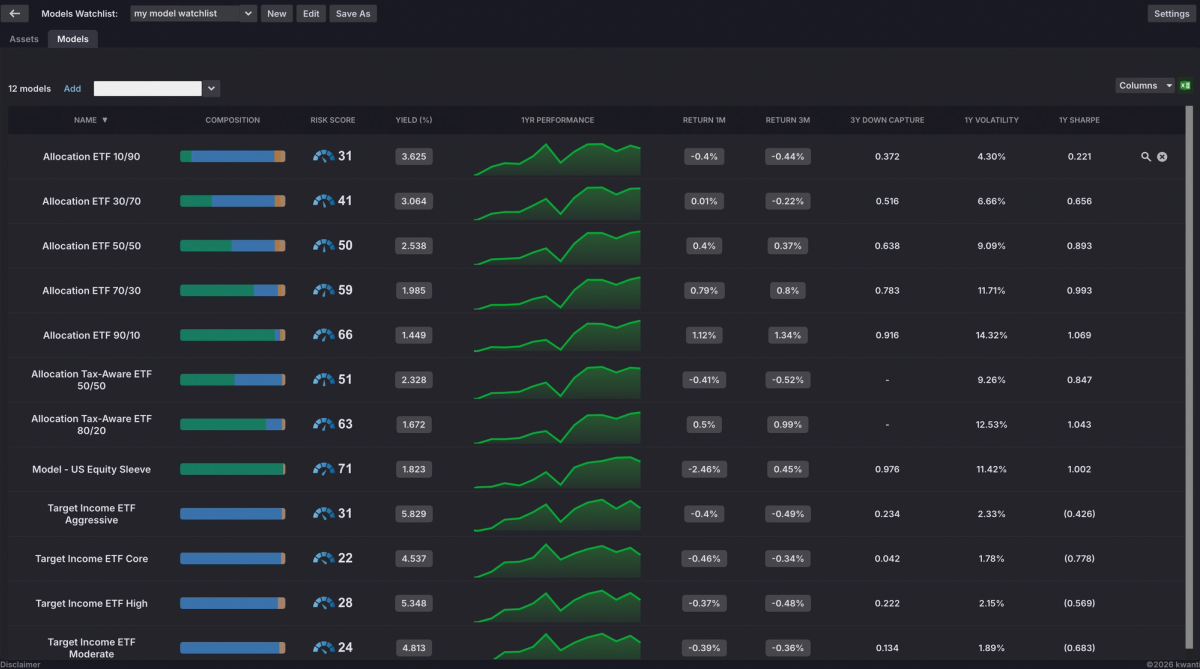
Kwanti now includes Model Watchlist, a companion to the existing Asset Watchlist that gives advisors a single view of composition, risk, and performance across their entire model lineup. Instead of opening each model individually, you can see the metrics that matter most side by side in one customizable table.
What is Model Watchlist?
Model Watchlist works like the Asset Watchlist, but tracks entire models rather than individual securities. Add any of your models to a watchlist and view metrics like Composition, Rebalance Strategy, # of Holdings, Yield, Risk Score, and Performance, all in one place.
You can include any model in your account, from models built in Kwanti to models imported from integration partners like Advyzon, iRebal, Nitrogen, and Orion, along with any model from the Model Marketplace.
Key Features
Customizable Columns – Select from a wide range of metrics organized by category: composition and holdings, performance, risk, and fees. Expand categories like Drawdown, Volatility, Sharpe, Sortino, and Return to add specific timeframes as their own columns. Drag and drop to reorder, and sort by any column with a single click.
Multiple Watchlists – Create as many watchlists as you need to organize different groups of models: core lineups, client sleeves, third-party models, or any grouping that fits your practice.
Excel Export – Export any watchlist to Excel with a single click for reporting, sharing, or further analysis.
Common Use Cases
All your model Risk Scores in one place – One of the most requested capabilities from advisors: a single view of Risk Scores across every model, without opening each one individually. Model Watchlist puts them side by side and lets you export the full list to Excel.
Compare models against a custom benchmark – Build a benchmark as a model portfolio (for example, a 60/40 blend using SPY and AGG), add it to your watchlist alongside your models, and compare as many models against it as you need.
Getting Started
Model Watchlist is accessible from the Portfolio Analytics section. Click Watchlist at the top of the screen and select the Models subtab to create your first watchlist.